The Camera ISP Color Processing Pipeline
The ISP does not apply color correction as one single step; it happens as part of a longer pipeline where each stage prepares the data for the next.
Suggested Diagram: End-to-end ISP color pipeline showing where color correction occurs, from raw sensor data through to final RGB or YUV output.
Raw Sensor Data
The pipeline starts with raw Bayer data straight from the sensor, where each pixel only holds information about one color, either red, green or blue.
Black Level Correction
Black level correction removes the small electrical noise floor of the sensor so that true black areas do not appear as dark grey.
Demosaicing
Demosaicing fills in the missing color values for each pixel by looking at its neighbors, turning the raw Bayer pattern into a full color image.
Auto White Balance (AWB)
Auto white balance adjusts the overall color temperature so that neutral colors like white and grey look neutral under any lighting condition.
Color Correction Matrix (CCM)
The color correction matrix applies precise mathematical weights to each color channel to correct the sensor’s natural color bias.
Gamma Correction
Gamma correction adjusts brightness levels in a non-linear way, so the image matches how human eyes perceive light and shadow.
Color Space Conversion (RGB/YUV)
The final stage converts the corrected RGB data into the color space needed for storage, streaming or display, usually YUV for video and RGB for stills.
How Color Correction Works Inside a Camera
Once the pipeline reaches the color correction stage, the ISP applies to a specific mathematical model that is unique to each sensor and lens combination.
Understanding the Color Correction Matrix (CCM)
The CCM is a 3×3 matrix that takes the raw red, green, and blue values from the sensor and transforms them into corrected values. Each value in the matrix represents how much one-color channel should influence another, and getting these numbers right is what separates a well-tuned camera from an average one.
Compensating for Sensor Color Differences
The batches of sensors are never alike, not even from the same manufacturer. Color correction helps to address this issue and ensure consistency of output even when there are some manufacturing differences, since this becomes very important when sending out thousands of cameras.
Adjusting RGB Channels for Natural Colors
The CCM does not treat all colors equally. The shades of skin color, the color of the sky, and the color of plants get special emphasis while adjusting the camera because our human eyes are more receptive towards these colors; even a slight mistake can be identified instantly.
Adapting to Different Lighting Conditions
A single fixed CCM cannot handle every lighting scenario. Good ISP design uses multiple CCM profiles that shift based on the detected light source, such as daylight, tube light, or tungsten bulb, so that color correction stays accurate across environments.
Role of Color Calibration in Camera Performance
Color calibration is the practical process that generates the actual numbers used inside the color correction matrix, and without it the ISP has nothing accurate to work with.
What Is Camera Color Calibration?
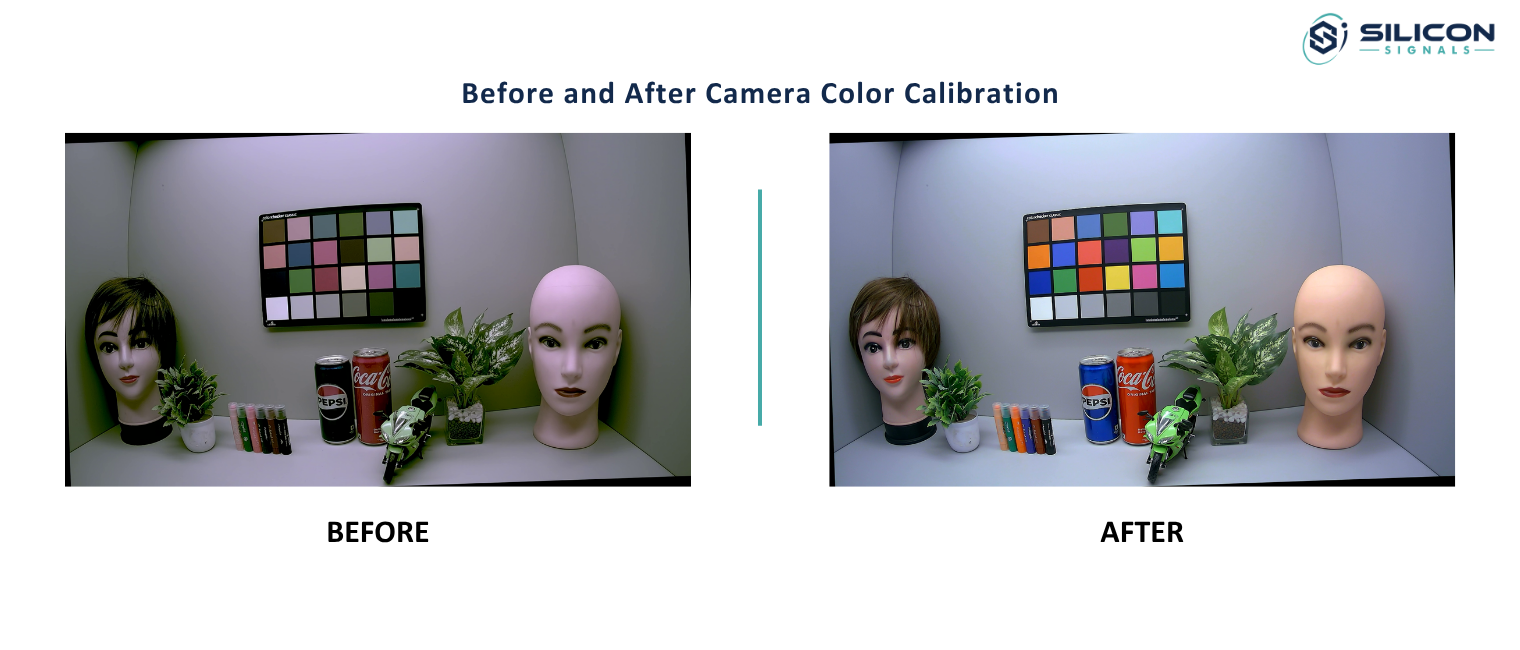
Camera color calibration is a lab process where a camera captures a known reference target under controlled lighting, and the difference between the captured colors and the known true colors is used to calculate correction values.
Using Color Charts During Calibration
Standard color charts with dozens of known color patches are placed in front of the camera during calibration. Engineers compare what the sensor captures against the known reference values of each patch and build the correction matrix from that data.
Factory Calibration vs Application-Specific Calibration
Factory calibration gives a general-purpose correction that works reasonably well for most use cases. Application-specific calibration goes further and tunes the camera for one environment, like a medical scanner or a paint inspection line, where general purpose settings are not accurate enough.
Why Calibration Must Be Repeated for Different Sensors and Lenses
A correction matrix created for a particular combination of sensor and lens does not transfer well to other combinations. Even a slight change in the type of coating on the lens or in the type of sensor will result in a different color response, requiring re-calibration.
Why Camera Tuning Is Essential for Accurate Colors
Camera tuning is the broader engineering effort that takes calibration data and turns it into a stable, real-world-ready ISP configuration.
Sensor-to-Sensor Variations
Sensors produced even on the same production line have some variance in their color sensing abilities. The tuning of the camera accommodates this variance by making sure that there is sufficient margin in the correction factors for all units within a batch.
Lens and Optical Characteristics
Lenses affect how light reaches the sensor, and some lenses introduce their own color shift toward the edges of the frame. Tuning has to consider the lens along with the sensor, since color correction in camera ISP is only as good as the optical data feeding into it.
Indoor vs Outdoor Lighting Optimization
Indoor light sources produce warmer tones while outdoor natural daylight produces cooler tones. A camera that has been adjusted to either one of these two situations will display poor color performance in the other, therefore the tuning process takes into account both conditions.
ISP Parameter Fine-Tuning for Different Applications
Security cameras, medical devices, and consumer phones all need different priorities in their tuning. A security camera might emphasize color accuracy under low-light conditions, but a phone’s camera might be more concerned about flattering skin colors.
5 Most Common Challenges in Color Correction
No matter how well-calibrated and tuned the system may be, the actual world presents challenges that are difficult to fully resolve.
- Mixed Lighting Environments The lighting of a room with natural light entering through a window and tube light coming from the roof makes it difficult for auto white balance to find a proper reference point, and hence color correction becomes a challenge.
- Low-Light Color Shifts When there is low light illumination, the noise from the sensor becomes much higher, making the process of color correction quite difficult. The colors tend to become washed-out or skewed towards a single channel, usually green or blue, when there is inadequate light on the sensor.
- Infrared Contamination In certain cases, the sensors continue to be responsive to the infrared light even when an IR filter is in place, leading to a pink or magenta cast in the camera images used for night vision purposes.
- Over-Saturated or Flat Colors If the color correction matrix is too aggressive, colors look artificially punchy and unnatural. If it is too conservative, the image looks flat and dull. Finding the right balance is one of the harder parts of camera tuning.
- Sensor Manufacturing Variations As mentioned earlier, no two sensor units are perfectly identical, and small manufacturing tolerances mean that a correction matrix built for an average unit may not be perfect for every single camera coming off the production line.
Applications Where Color Accuracy Is Critical
Some industries simply cannot afford wrong colors, and this is where color correction in camera ISP becomes a business requirement rather than a nice-to-have feature.
Industrial Machine Vision
On a factory line, machine vision cameras check for defects, sort products by color, and read labels. Wrong color output here directly leads to wrong sorting decisions and quality control failures.
Medical Imaging Systems
In endoscopy, dermatology and pathology imaging, doctors rely on true color reproduction to judge tissue health. A color shift in these systems is not just a visual annoyance; it can affect a medical decision.
Retail and Product Inspection
Online retail depends heavily on product photos matching real products. Inspection cameras employed within warehouses also rely on correct color representation to detect packaging problems or damaged products.
Security and Surveillance Cameras
Video footage can serve as evidence, and thus correct color reproduction allows for identification of clothing, cars, or other elements involved in the situation being observed after the event has occurred.
Automotive Camera Systems
Driver assistance and autonomous vehicles rely on color recognition of traffic lights, braking lights, road markings, and other elements, all of which require correct color recognition under changing lighting conditions.
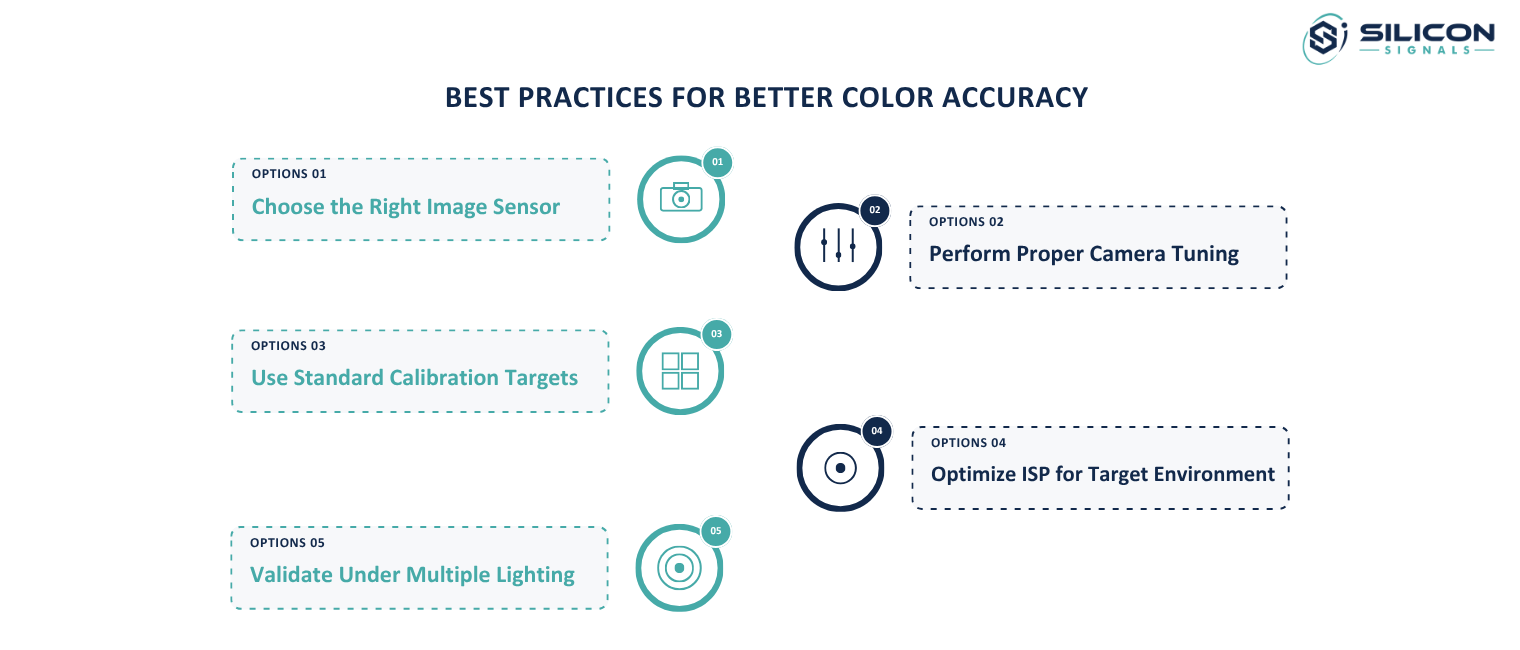
Best Practices for Better Color Accuracy
Getting color correction in camera ISP right consistently comes down to a few engineering practices that experienced teams follow closely.